UpScrolled
- 4.7
- Rating
- 1.00M
- Installs
- Free
- Price

 Analysis by App-foxy
I approached UpScrolled as a social app for people who want their own voice to be more visible without treating every post like a polished broadcast. Its central idea is simple: express yourself, create something worth sharing, and connect with other people. In practice, I found that the value depends less on opening it once and more on building a repeatable habit around what I want to say, who I want to reach, and how much time I am willing to spend responding.
That makes it an interesting choice in a crowded social category. It is free, developed by UpScrolled, and aimed at a Teen audience. The app has reached over a million installs and holds a 4.7 average from around twenty-five thousand ratings, which suggests that its basic experience is landing well with a substantial audience. I would not treat those numbers as a substitute for trying it yourself, but they do make it easier to see UpScrolled as an established social option rather than an experiment with no community around it.
How UpScrolled fits into a normal social routine
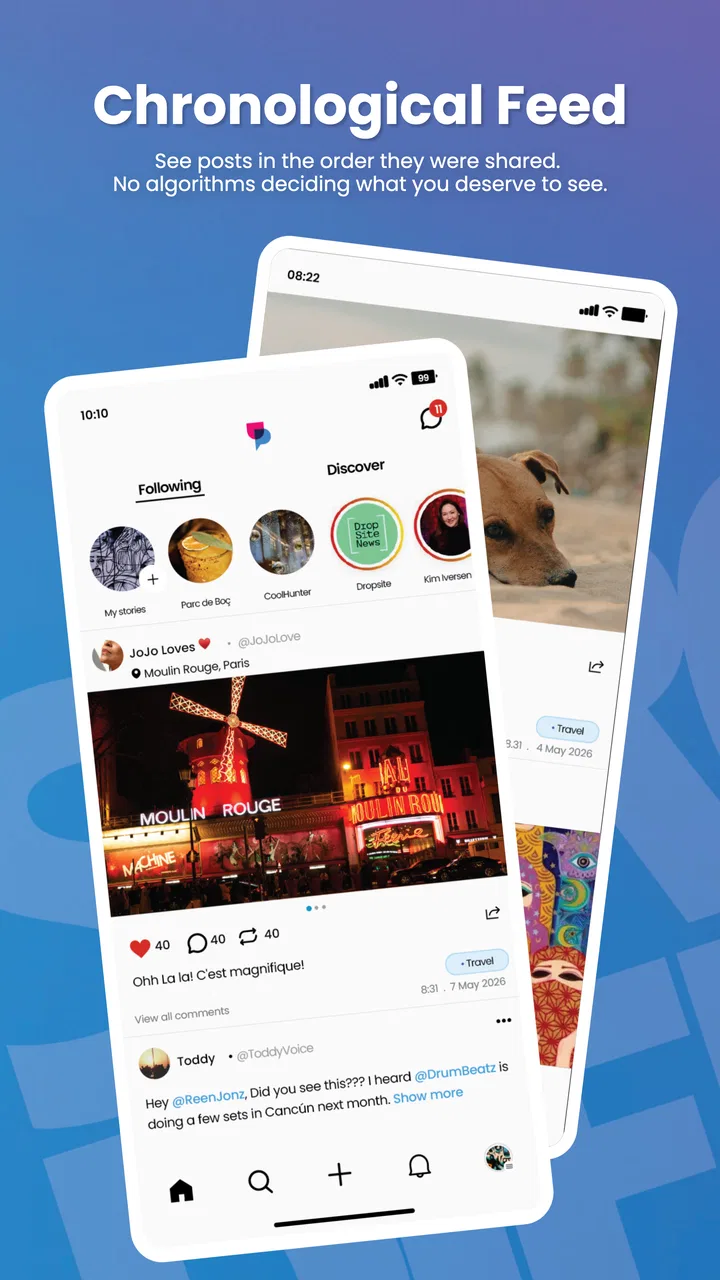
My preferred way to use it is not to scroll endlessly. I open it with a small purpose: share an observation, check what people I follow are discussing, or return to a conversation that deserves a thoughtful reply. That distinction matters because a social feed can easily become passive entertainment. UpScrolled feels more useful when I treat it as a place to contribute rather than only consume.
You May Also Like

 Blood Strike: 2.5 Anniversary
Blood Strike’s Loadouts Turn Every Drop Into a Tactical Gamble
A close look at Blood Strike’s custom loadouts: how fast access to signature weapons reshapes its battle royale rhythm, rewards preparation, and narrows the gap between fights.

 Pandora - Music & Podcasts
Pandora’s Music Is Easy to Start, but Harder to Recover
Pandora’s strength is its low-effort path from a seed to a station. Its weak spot is how much confidence it asks you to place in connection, setup, and quiet recovery.

 8 Ball Pool
 Is Built on Rivalries, Rematches, and Routine
A close look at the rivalries, rematches, shared routines, and unanswered safety questions that turn a quick pool match into a persistent mobile community.

 Samsung Music
’s Quiet Strength Is Playing What You Already Own
Its reach comes less from spectacle than from dependable access to a personal library. That simplicity is both the app’s strongest retention engine and its ceiling.

 AccuWeather: Weather Radar
AccuWeather Review: A Quick, Clear Forecast for Everyday Decisions
For everyday plans, the best forecast is the one you can understand quickly. AccuWeather makes rain timing, radar, and local conditions easy to act on, with a few trade-offs.

 Hill Climb Racing
Why Hill Climb Racing Still Turns Crashes Into One More Run
A tiny car, a bumpy hill and one more upgrade: Hill Climb Racing keeps resurfacing because its simple chaos makes every near-miss feel personal.
More From Our News Desk
View All News


A realistic everyday scenario would be a short break between tasks. I might have a quick idea about a book, a local event, a hobby, or a question that would benefit from different opinions. Instead of drafting a long post, I would write the clearest version first, reread it once, and then publish it. Later, I could return to the responses and continue the conversation when I have enough attention to do so properly. This workflow keeps the app from taking over the whole day while still giving it a meaningful role.
The strongest early habit is deciding what kind of participation I want. If I am there to meet people with similar interests, I focus on finding conversations where I can add something specific. If I am there to share creative work, I spend more time making the post understandable without extra context. If I am there for updates from a community, I avoid reacting to every item and save my energy for discussions that genuinely matter.
The most useful shift is to use UpScrolled deliberately instead of waiting for the feed to decide what deserves my attention. That sounds obvious, but it changes the quality of the experience. I notice more relevant conversations, write better replies, and leave with less of the vague feeling that I have spent time online without doing anything memorable.
What the first session tells you
The first session is a good test of whether the app matches your social style. I look at how quickly I can understand the main stream, whether the available conversations feel varied, and whether posting feels natural enough that I would actually do it again. I also pay attention to the balance between reading and responding. An app can have attractive content but still be a poor fit if it makes every interaction feel like work.
For a new user, I recommend resisting the urge to publish immediately just to fill a profile. Spend a little time observing the tone of the community and the kinds of posts that receive useful responses. This is not about copying popular content. It is about learning the local rhythm: whether concise comments work better than long explanations, whether questions lead to discussion, and whether people respond more warmly to personal examples than broad statements.
That observation period also helps answer a practical question: is UpScrolled better for public expression or for keeping up with a close circle? My impression is that it is more compelling for people who enjoy discovering voices beyond their existing contacts. Someone who only wants private messaging or a tightly controlled group space may find a dedicated messenger or community tool more suitable.
Settings and choices worth checking early
I would not rush past the app’s available settings. Even when a social app is easy to use, small choices about how I browse and interact can determine whether it feels calm or distracting. I check the notification controls first and keep only the alerts that help me return to conversations I actually care about. If every interaction demands immediate attention, the app becomes a source of interruptions rather than a tool for connection.
I also review the account and privacy-related choices before becoming active. Social posting is easier when I understand who can see what I share and how exposed I want my profile to be. My advice is to begin conservatively, especially if I am testing the app with personal stories or creative work. I can always become more open later, but it is harder to take back something after it has been shared widely.
Another useful check is the way the app handles the visual and reading experience. I prefer a setup that lets me scan comfortably without making the screen feel crowded. If a setting reduces unnecessary movement or helps me focus on text, I use it. The exact preference is personal, but the principle is consistent: make the feed serve my attention instead of constantly competing for it.
Because UpScrolled is rated Teen, I would still encourage younger users and families to discuss sensible boundaries around public posting, replies, and personal information. An age label is not a substitute for judgment. I would avoid sharing identifying details, private schedules, or anything I would regret seeing outside the original context. That is especially important in a social app built around amplifying individual voices.
Repeatable patterns that make posting easier
Experienced use is mostly about reducing friction before I open the app. I keep a short mental list of subjects I genuinely care about, so I am not trying to invent a personality on demand. When an idea appears during the day, I turn it into a simple note or remember the key point. Then, when I have time, I can shape it into a post with a clear beginning and a reason for someone else to respond.
A practical pattern is to give each post one job. It can ask a real question, explain a small discovery, share a creative result, or invite people to compare experiences. Posts become harder to follow when they attempt all of those things at once. I have found that a focused message usually creates a better starting point for conversation than a vague announcement.
Replies deserve their own strategy. Instead of answering with a quick agreement, I try to add an example, a useful distinction, or a follow-up question. This makes the exchange feel less like collecting reactions and more like building a relationship. It also helps me decide which conversations are worth revisiting. A thoughtful thread can be more valuable than a large number of shallow interactions.
Another efficient habit is batching social time. I might check the feed briefly, write one worthwhile response, and leave. Later, I can return for a second pass if a conversation has developed. This works better for me than keeping the app open all day, because I can give replies proper attention without turning every notification into a command.
For creative users, I recommend separating creation from promotion. First make the post understandable and complete on its own. Then consider how to introduce it to the community. If the content needs a long explanation before anyone can appreciate it, the opening may need work. If it is personal, I decide in advance which details are essential and which should remain private. This small editing step improves both clarity and comfort.
Where it compares well with familiar alternatives
Compared with a traditional social network built around a large existing contact list, UpScrolled is more appealing when I want to encounter new perspectives rather than only see updates from people I already know. That can make discovery feel fresher, but it also means I need to be more selective about whom I follow and which discussions deserve my time.
Compared with short-form entertainment feeds, its appeal is less about rapid stimulation and more about expression and conversation. If my goal is simply to watch an endless stream of brief content, another platform may feel faster and more immediately rewarding. UpScrolled makes more sense when I want my own contribution to matter, even if that requires a little more thought.
It also differs from private group apps. A closed group can offer stronger context and a clearer sense of membership. UpScrolled is better suited to broader discovery and sharing a point of view beyond a small circle. The trade-off is that wider reach can bring less predictable responses, so I need to be comfortable with a more open social environment.
For professional networking, I would choose a platform designed specifically for work. UpScrolled may help me connect around interests or ideas, but I would not use it as a replacement for a professional profile, a portfolio service, or a structured collaboration tool. Its strength is personal expression, not formal career management.
Limits that become clearer with regular use
The same openness that makes a social app interesting can also make it tiring. Not every conversation will be thoughtful, and not every post will find the audience I hoped for. I have to accept that visibility is uneven. A quiet response does not necessarily mean the idea failed, but users who need predictable reach may become frustrated.
There is also a difference between having a voice and being heard immediately. UpScrolled can provide a place to publish, but it cannot guarantee that every contribution will produce a lively discussion. I consider that a healthy limitation rather than a flaw, yet it is important to understand before investing emotional energy in reactions and metrics.
Another limitation is that social discovery requires ongoing curation. If I follow too many unrelated accounts or respond to every tempting topic, the experience becomes noisy. The app works best when I periodically reconsider what I want from it. Unfollowing, muting, or simply ignoring irrelevant material can be more effective than trying to read everything.
I would also skip it if I am looking for a completely private journal, a dedicated workroom, or a platform where every interaction is tightly moderated around one specialist subject. Those needs call for different tools. UpScrolled is strongest in the middle ground: public or broader social expression, discovery, and conversation.
Using the current release without overcomplicating it
The current version is 1.5.0, and it runs on Android 8.0 or later. That makes it accessible to people who are not using the newest phone, although the overall experience will still depend on the device and operating system. I would keep the app updated through the normal store process, especially for a social product where reliability and account access matter.
Since the app is free, the main investment is attention rather than money. That is useful for trying it without commitment, but it also makes time management important. I would set a simple rule before becoming active: decide how often I want to check it, what I am willing to share, and what kind of interaction counts as worthwhile. Without those limits, any social app can quietly expand to fill every spare moment.
One advanced but realistic workflow is to maintain a small personal checklist before publishing: Is the point clear? Am I comfortable with the audience? Does the post invite the kind of response I want? Have I removed details that do not need to be public? This takes less than a minute and prevents many avoidable regrets. It also gives my posts a more consistent voice without making them sound manufactured.
Who will get the most from it
I think UpScrolled is a good match for people who enjoy writing short thoughts, sharing creative work, asking questions, and meeting others through common interests. It is especially suitable for someone who wants more than passive scrolling but does not need the formal structure of a professional network or the privacy of a messaging app.
It may also suit newcomers to social posting because the core idea is easy to understand. I can begin with observation, move into occasional replies, and publish more often only when the experience feels comfortable. The app does not need to become my primary online identity to be useful. A modest, intentional presence can be enough.
I would be more cautious if I am highly sensitive to public feedback, easily distracted by notifications, or looking for guaranteed audience growth. The social nature of the product means that uncertainty is part of the experience. Users who prefer predictable, private, or tightly moderated communication should compare it with alternatives before settling in.
My verdict after building a steady habit
UpScrolled works best when I approach it as a place to contribute, not as another feed to conquer. Its combination of expression, creation, and connection gives it a clear identity within the social category, and the strong user response suggests that many people find that identity appealing. I like that it can support a quick question, a considered reply, or a creative share without requiring me to turn every interaction into a major production.
My recommendation comes with one condition: use its settings and habits to protect your attention. Keep notifications purposeful, learn the community before posting heavily, give each post a clear job, and review your audience choices before sharing personal details. Those steps do more for the experience than trying to maximize activity.
For me, the app is most rewarding when I open it with an intention and leave after making one useful contribution or finding one worthwhile conversation. It is not the right replacement for every social tool, and it cannot promise that every voice will receive equal attention. But if you want a free space to express ideas, discover people beyond your immediate circle, and practice more deliberate online conversation, UpScrolled is worth trying.
FAQs for UpScrolled
01What is UpScrolled and what does it offer?
UpScrolled is a dynamic news aggregator app designed to provide users with a personalized news feed. It curates content from various sources based on user preferences, ensuring that users receive updates on topics they care about. The app's intuitive design and user-friendly interface make it easy to navigate and customize.
02Is UpScrolled available for both Android and iOS?
Yes, UpScrolled is available for download on both Android and iOS platforms. Users can find it on the Google Play Store for Android devices and the Apple App Store for iOS devices. The app is optimized for both operating systems, offering a seamless experience regardless of the device.
03Does UpScrolled require a subscription or have in-app purchases?
UpScrolled offers a free version with basic features accessible to all users. However, it also provides a premium subscription option, which unlocks additional features such as ad-free browsing, advanced customization options, and early access to new updates. In-app purchases are also available for specific features.
04How does UpScrolled ensure content relevance and accuracy?
UpScrolled uses advanced algorithms and machine learning to analyze user interactions and preferences, curating content that matches user interests. It sources news from reputable outlets and conducts regular updates to maintain accuracy and relevance. Users can also customize their feeds to prioritize trusted sources.
05What are the privacy policies of UpScrolled?
UpScrolled prioritizes user privacy and data security. The app collects minimal user data, primarily for enhancing user experience and personalizing content. It complies with all major data protection regulations and provides users with control over their personal information. Detailed privacy policies are accessible within the app.
Pros
- User-friendly interface enhances navigation.
- Customizable settings for tailored experiences.
- Fast loading times improve usability.
- Offline mode for data-saving convenience.
- Regular updates with new features.
Cons
- Limited free features before paywall.
- Occasional bugs disrupt smooth operation.
- Requires significant storage space.
- In-app ads can be intrusive.
- No integration with other popular apps.

UpScrolled
Gallery